Processes & Signals
What is a Process?
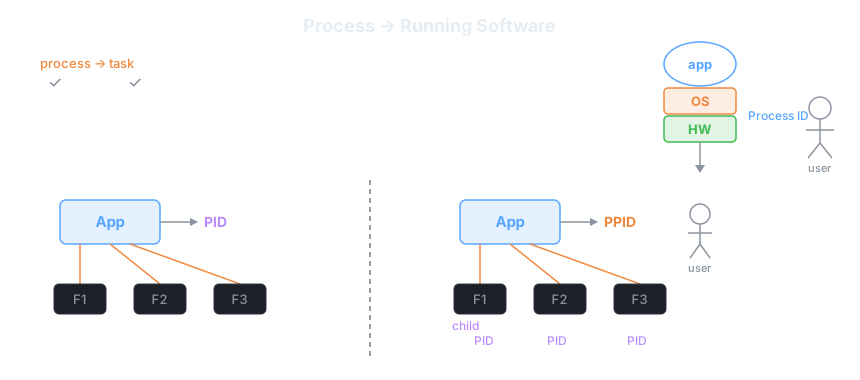
A process is a running instance of a software program. When you execute any application — a web server, a script, a database — the OS creates a process for it. Think of it this way:
- Program = the static code sitting on disk (like a Laravel project folder)
- Process = that code actively running in memory, consuming CPU and RAM
The OS (through the Hardware layer) assigns every process a unique numeric identifier called a Process ID (PID). The OS also tracks which user owns the process — so it can enforce permissions (just like file ownership).
Laravel analogy: When you run php artisan serve, Laravel spawns a process. That process gets a PID. If you run it again in another terminal, a second process with a different PID is created.
Parent & Child Processes (PID / PPID)
Processes form a tree hierarchy. When one process launches another, the original becomes the parent and the new one becomes a child.
- PID — Process ID: unique identifier for this process
- PPID — Parent Process ID: the PID of whoever spawned this process
Example: your shell (bash) has PID 100. You run a script — that script's process gets PID 200 and PPID 100. The script starts three sub-tasks (F1, F2, F3), each getting their own child PIDs.
# See full process tree (visual hierarchy)
pstree -p

# Output example:
systemd(1)─┬─sshd(850)───sshd(1200)───bash(1201)───ps(1500)
           └─nginx(950)─┬─nginx(951)
                        └─nginx(952)
Laravel analogy: php artisan queue:work is the parent. Each job it processes forks a child. If you run multiple workers with Supervisor, each worker is a child of the Supervisor parent process.
Listing Processes — pidof, pgrep, ps, pstree, top
Linux gives you several tools to inspect running processes, grouped by use case:
1 — Find a PID by name: pidof and pgrep
# pidof — returns PID(s) of a process by exact name
pidof nginx          # e.g. outputs: 951 952
pidof php-fpm

# pgrep — like pidof but supports patterns and more options
pgrep nginx          # same result
pgrep -u www-data    # all processes owned by www-data user
pgrep -l nginx       # show PID + name side by side
2 — Snapshot of processes: ps
# ps -p PID — details about one specific process
ps -p 951

# ps -p PID PID — details about multiple specific processes
ps -p 951 952

# ps -aux — ALL processes from ALL users, detailed view (most common)
ps -aux
# columns: USER  PID  %CPU  %MEM  VSZ  RSS  TTY  STAT  START  TIME  COMMAND

# ps -ef — similar to -aux, POSIX-compatible format
ps -ef
# columns: UID  PID  PPID  C  STIME  TTY  TIME  CMD
The key difference: ps -aux shows %CPU and %MEM percentages; ps -ef shows PPID (parent PID) — use -ef when you need the process tree relationship.
3 — Process tree: pstree
# pstree — visual tree of all processes
pstree

# pstree -p — include PIDs in the tree
pstree -p
4 — Live monitor: top
# top — real-time process monitor (like Task Manager)
top

# Useful keys while inside top:
# q     — quit
# k     — kill a process (prompts for PID then signal)
# M     — sort by memory
# P     — sort by CPU
Laravel analogy: ps -aux | grep artisan is the equivalent of checking Laravel Horizon's dashboard — you see which queue workers are alive and how much CPU they're consuming.
Signals (1–31) — Talking to Processes
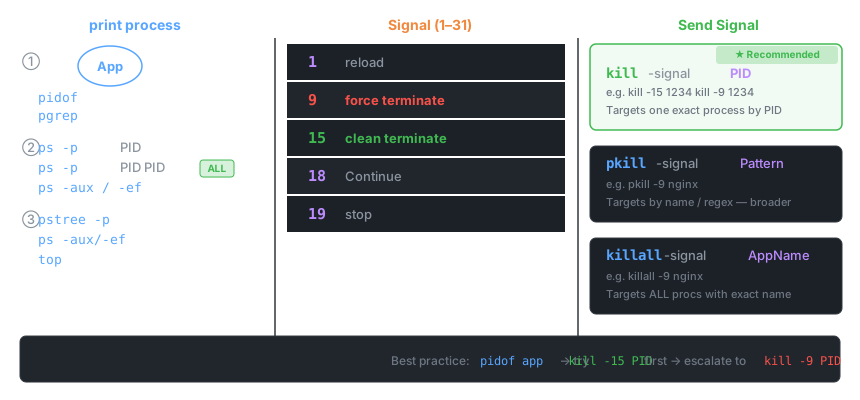
A signal is a numbered message you send to a process to change its behavior. Linux defines signals 1–31. You don't need to memorize all of them — focus on the five the instructor highlighted:
| Number | Name | Effect |
|---|---|---|
1 |
SIGHUP |
Reload — tells the process to re-read its config without restarting (used by nginx, sshd) |
9 |
SIGKILL |
Force terminate — cannot be caught or ignored; OS kills the process immediately |
15 |
SIGTERM |
Clean terminate — asks politely; process can finish in-flight work then exit gracefully |
18 |
SIGCONT |
Continue — resume a previously stopped/paused process |
19 |
SIGSTOP |
Stop (pause) — suspends the process; it stays in memory but does not execute |
Recommended default: Always try 15 (SIGTERM) first. Only escalate to 9 (SIGKILL) if the process refuses to stop — because SIGKILL gives it no chance to clean up (close files, flush DB writes, release locks).
Laravel analogy: SIGTERM is like calling php artisan queue:restart — workers finish the current job then exit cleanly. SIGKILL is yanking the power cord — the job being processed is lost and may leave the queue in a bad state.
Sending Signals — kill, pkill, killall
Three commands let you send signals to processes, differing in how you target them:
kill — target by PID (recommended)
# Syntax: kill -signal PID
kill -15 1234        # send SIGTERM (clean stop) to PID 1234
kill -9  1234        # send SIGKILL (force kill) to PID 1234
kill -1  1234        # send SIGHUP (reload config) to PID 1234

# Default signal is 15 if you omit -signal:
kill 1234            # same as kill -15 1234
pkill — target by name pattern
# Syntax: pkill -signal pattern
pkill -15 nginx      # SIGTERM all processes matching "nginx"
pkill -9  php        # force-kill all processes whose name contains "php"

# pkill supports regex patterns — useful when process names vary:
pkill -9 "php.*fpm"  # matches php-fpm, php8.1-fpm, etc.
killall — target by exact app name
# Syntax: killall -signal AppName
killall -9  nginx    # kill ALL nginx processes (exact name match)
killall -15 apache2

# killall vs pkill:
# killall = exact name match
# pkill = substring / regex match- Find the PID:
pidof nginxorpgrep nginx - Try graceful stop first:
kill -15 <PID> - If still running after a few seconds:
kill -9 <PID>
✓ Key Takeaways
- A process = a running program; every process gets a unique PID from the OS
- Processes form a tree: each child knows its parent via PPID
pidof/pgrep— find a PID by name;pgrep -lshows name alongside PIDps -aux— snapshot of all processes with CPU/MEM%;ps -efshows PPID relationshipspstree -p— visual parent→child hierarchy with PIDs;top— live real-time monitor- Signals are numbered messages: 1=reload, 9=force kill, 15=clean kill, 18=continue, 19=stop
- Always try SIGTERM (15) before SIGKILL (9) — give the process a chance to clean up
killtargets by PID (precise),pkillby pattern (flexible),killallby exact name (broad)- SIGKILL cannot be caught or ignored — the OS forcefully removes the process